AI in Photography – Amazing Ways to Make Every Picture Stand Out
Published: 20 Nov 2026
As a photographer, I have seen how technology is changing every part of our creative world. AI has become one of the most helpful tools in photography today. It helps us capture perfect shots, edit faster, and bring more emotion to every image. AI is not here to take our place but to make our creative process smoother and smarter.
Let’s explore all the important roles AI plays in photography and how it is changing the way we see and create images.
Contribution of AI in Photography
Here are the key roles of AI that every modern photographer should know:
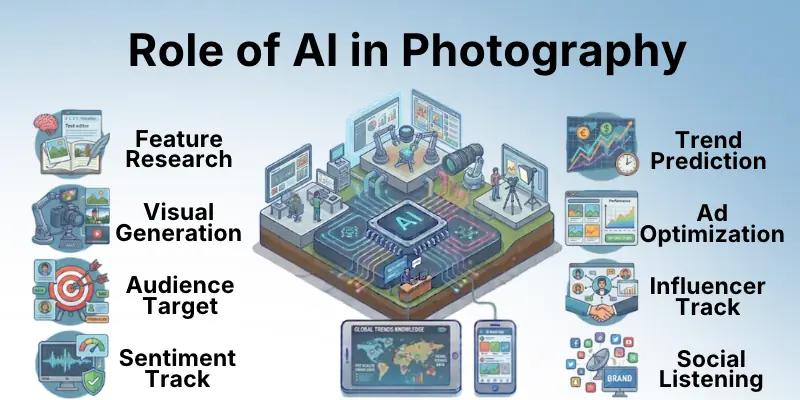
- Image Enhancement and Correction
- Noise Reduction and Detail Recovery
- Smart Editing and Retouching
- Composition and Framing Assistance
- Facial Recognition and Tagging
- Background Removal and Replacement
- Creative Filters and Style Transfer
- Restoration and Colorization of Old Photos
- AI Powered Camera Features
- Workflow Automation and Photo Management
Now let’s look at each of these roles in detail.
1. Image Enhancement and Correction
AI helps photographers improve image quality instantly. It balances light, color, and contrast without losing the natural look. This saves hours of manual editing and helps deliver professional results quickly. AI tools also make underexposed photos bright and clear again.
Examples:
- Adobe Sensei (Photoshop & Lightroom): Automatic light and color correction
- Luminar Neo: AI sky and lighting enhancement
- Snapseed: Auto tune for fast image adjustments
Intelligent tools make photos brighter, clearer, and more attractive. They help photographers achieve professional results with less effort.
2. Noise Reduction and Detail Recovery
Low light photos often have unwanted noise or blur. AI removes noise while keeping fine details intact. It understands what should stay sharp and what should be smoothed. This feature is perfect for night or event photography.
Examples:
- Topaz DeNoise AI: Removes digital noise effectively
- DxO DeepPRIME: Enhances clarity in high ISO photos
- ON1 NoNoise AI: Fixes low light photos instantly
Advanced technology removes noise while preserving important details. This makes low light photos cleaner and sharper.
3. Smart Editing and Retouching
AI can edit portraits, landscapes, and products in seconds. It finds faces, skin, eyes, and objects and adjusts them automatically. It smooths skin, removes marks, and even changes makeup lighting. This makes editing easy even for large photoshoots.
Examples:
- PortraitPro AI: Skin and face retouching
- Luminar AI: Sky and portrait enhancement
- Adobe Photoshop AI Tools: Remove unwanted items and fix lighting
Automated editing creates polished images in less time. It lets photographers focus more on creativity.
4. Composition and Framing Assistance
AI helps photographers improve framing and balance. It suggests better cropping and angles for more professional composition. Cameras with AI even guide users during shooting to get the best results. This makes photos more creative and well balanced.
Examples:
- Google Pixel Camera AI: Smart composition and auto framing
- Sony Alpha Cameras: Real time AI scene detection
- Canva AI Crop Tool: Suggests ideal framing for social media posts
Smart camera features improve framing and visual balance. They help photographers capture more appealing images.
5. Facial Recognition and Tagging
AI can identify people, pets, and objects in photos automatically. It tags images to make photo organization faster and easier. This helps photographers who handle large event or portrait sessions. It saves time that can be used for more creative work.
Examples:
- Google Photos: Groups photos by face automatically
- Apple Photos: Identifies people and places
- Lightroom AI Search: Finds photos by person or object instantly
Intelligent recognition makes finding specific photos easier. It saves time when managing large image collections.
6. Background Removal and Replacement
AI detects the main subject and removes the background in seconds. You can replace it with any color, scene, or design you want. This role is helpful for product, fashion, or advertising photography. It saves effort that used to take hours in manual editing.
Examples:
- Remove.bg: Fast and clean background removal
- Canva Pro: AI powered background changer
- Adobe Express: Replace skies or add creative backdrops
Automated tools create clean, attractive backgrounds quickly. They make product and promotional photos more appealing.
7. Creative Filters and Style Transfer
AI helps photographers add unique visual styles to images. It transfers the look of one photo to another in just one click. You can make your photos look like artwork, film scenes, or vintage shots. This inspires creative freedom and experimentation.
Examples:
- Prisma: Turns photos into painting like styles
- DeepArt: Transfers visual styles from famous artists
- Runway ML: Applies advanced AI visual effects
Smart creative tools add unique styles to ordinary photos. They help photographers create distinctive, eye-catching images.
8. Restoration and Colorization of Old Photos
AI can repair old, damaged, or black and white photos. It removes scratches, restores missing details, and adds natural color. This is a powerful way to preserve family memories and history. Many heritage photographers now use AI for restoration work.
Examples:
- MyHeritage AI: Restores and colorizes vintage photos
- DeOldify: Adds realistic colors to black and white images
- Remini: Fixes blurry or damaged faces in old photos
Advanced technology restores damaged photos and adds natural colors. It helps preserve precious memories for future generations.
9. AI Powered Camera Features
Modern cameras now have built in AI features. They adjust exposure, detect scenes, and track moving subjects automatically. AI helps you take perfect photos even in difficult lighting conditions. It also improves focus and stabilizes movement.
Examples:
- Nikon Z9: AI subject tracking and detection
- Sony A7 Series: Real time eye and motion tracking
- Google Pixel Cameras: AI scene optimization
Smart camera systems improve focus and track moving subjects. They help capture sharp photos in challenging conditions.
10. Workflow Automation and Photo Management
AI helps photographers organize, select, and edit photos faster. It can pick the best shots from thousands automatically. It also names and tags photos to make searching easy. This gives photographers more time for creativity instead of sorting.
Examples:
- AfterShoot: AI based photo culling tool
- Narrative Select: Ranks images by quality and expression
- Lightroom AI: Organizes and enhances large photo libraries
Automated systems simplify photo selection and organization. They give photographers more time for creative work.
Benefits of AI in Photography
Intelligent photography tools help photographers edit faster, improve image quality, and manage photos more easily. They also encourage creativity and bring old memories back to life.
Some major benefits that artificial intelligence brings to photographers are:
- Speeds up the editing process
- Improves image quality automatically
- Helps photographers focus on creativity
- Organizes large photo libraries
- Restores and enhances old memories
- Supports professionals in every genre
These benefits make photography more efficient, creative, and accessible. Smart editing solutions help photographers achieve better results with less effort.
Challenges of AI in Photography
Despite its advantages, intelligent photography technology can affect creative control, change natural colors, and increase editing costs. Photographers must carefully review automated edits to maintain image quality.
Some major challenges of artificial intelligence in photography are:
- Too much automation may reduce creative control
- AI sometimes changes natural tones
- High end AI software can be costly
- Photographers must still check and refine AI edits
Understanding these challenges helps photographers balance automation with personal creativity. Careful editing and human judgment ensure more natural and reliable results.
Future of AI in Photography
The future of photography with AI looks exciting. Soon, cameras may predict lighting setups or recommend the best angles before shooting. AI might even help create 3D or interactive photos for virtual displays. Still, creativity and vision will always belong to the photographer. AI is just a smart companion that makes our art more powerful.
Final Note
In this guide, we explored the many roles of AI in photography. From editing and enhancement to restoration and workflow, AI supports photographers at every stage. It saves time, improves quality, and allows more focus on creativity and storytelling. Photography’s heart is still human emotion, and AI just gives it new wings to fly higher.
If you like reading this article, share your thoughts in the comment section.
FAQs About AI in Photography
Artificial intelligence is transforming photography with smarter editing, better image quality, and creative tools. Here are some of the most commonly asked questions related to the role of AI in photography.
1. What is AI photography?
AI photography uses intelligent tools to improve images automatically. It helps adjust lighting, enhance colors, and improve composition, making professional looking photos easier for beginners and experts.
2. How is AI in photography changing the industry?
AI is making photography faster, easier, and more creative through features such as:
- Faster editing: Reduces manual work.
- Smart organization: Sorts and tags photos.
- Creative enhancements: Removes backgrounds and adjusts lighting.
3. How can AI for photography improve image quality?
AI improves image quality through these steps:
- Analyzes lighting, colors, and details.
- Detects blur, noise, and visual errors.
- Enhances sharpness, brightness, and color balance.
The result is a clearer, more polished image with less manual editing.
4. What are the benefits of AI for photographers?
| Benefit | How it helps |
| Faster editing | Saves valuable time |
| Better image quality | Enhances colors and details |
| Easy organization | Sorts large photo collections |
| Creative freedom | Simplifies retouching and visual effects |
5. Can AI photographers replace human photographers?
No, AI cannot fully replace human photographers. Although automated tools can capture and edit images, human photographers bring emotion, artistic judgment, storytelling, and personal creativity to their work.
6. How do tools using AI and photography work together?
AI powered photography tools analyze images and automatically perform tasks such as:
- Detecting faces and objects.
- Adjusting focus and lighting.
- Reducing noise and applying creative effects.
These features help photographers produce attractive images more efficiently.
7. What is the role of photography and AI in editing old pictures?
Photography and AI work together to restore old images by repairing damage, reducing blur, and adding color to black and white photos. This helps preserve precious family memories and historical photographs.
8. How do mobile phones use AI photography today?
Modern smartphones use AI photography to improve everyday pictures. Common features include:
- Automatic brightness and color adjustments.
- Face detection and subject tracking.
- Night photography enhancement.
- Smart framing and scene recognition.
9. What kind of AI for photographers tools are most popular?
Popular photography tools offer different features depending on the user’s needs.
| Tool | Main use |
| Adobe Sensei | Automatic image enhancement |
| Luminar Neo | Portrait and sky editing |
| Topaz Labs | Noise reduction and detail enhancement |
10. What is the future of AI in photography and photo editing?
The future of AI in photography will bring more advanced editing, smarter cameras, and faster creative workflows. Photographers may benefit from real time shooting suggestions, improved image restoration, and more personalized editing tools.






- Be Respectful
- Stay Relevant
- Stay Positive
- True Feedback
- Encourage Discussion
- Avoid Spamming
- No Fake News
- Don't Copy-Paste
- No Personal Attacks
- Be Respectful
- Stay Relevant
- Stay Positive
- True Feedback
- Encourage Discussion
- Avoid Spamming
- No Fake News
- Don't Copy-Paste
- No Personal Attacks
