Role of AI in Education in 2026 – Future Tech in Modern Studies
Published: 29 Oct 2026
Artificial Intelligence, or AI, is making big changes in how we learn and teach. The role of AI in education means using smart tools to help students learn better and make teachers’ work easier. It helps create lessons that fit each student, checks homework faster, and gives useful feedback.
This guide covers artificial intelligence’s role in education, how it works in schools, its benefits and drawbacks, and how it will shape the future of learning.
What are the Major Roles of AI in Education
To understand the role of artificial intelligence in education, it’s important to know how it is being used in classrooms and how traditional teaching methods are being replaced by modern, smart technologies.
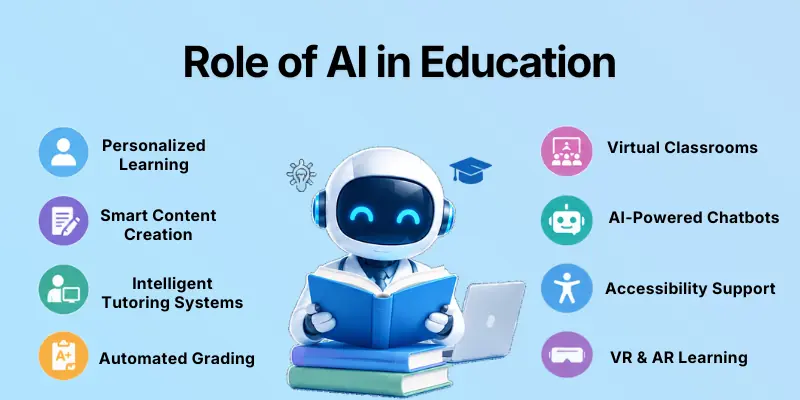
Here are some of the main applications of AI in education that show how deeply it is changing the learning process:
- Personalized Learning
- Smart Content Creation
- Intelligent Tutoring Systems
- Automated Grading
- Predictive Analytics
- Virtual Classrooms
- AI-Powered Chatbots
- Adaptive Assessments
- Speech Recognition Tools
- Plagiarism Detection
- Administrative Automation
- Learning Management Systems (LMS)
- Accessibility Support
- Emotion Recognition Systems
- AI in Career Guidance
- Smart Classrooms
- Gamified Learning
- Virtual Reality (VR) & Augmented Reality (AR)
- Language Translation Tools
- Research Assistance
Let’s explore each of these AI uses in education in detail to understand how they are shaping the future of learning.
1. Personalized Learning
I believe one of the biggest changes in modern education is how learning can now fit each student’s needs. Personalized learning means creating lessons that adjust to every student’s level, pace, and learning style. The system studies how a student learns, then suggests lessons or questions that match their progress.
Benefits:
- Helps every student learn at their own speed
- Builds confidence through lessons that fit individual skills
- Improves results with focused learning paths
- Reduces pressure and keeps students motivated
Examples:
- Platforms like Khan Academy and DreamBox offer lessons based on a student’s performance
- Language learning apps like Duolingo give different levels of practice depending on how well you perform
AI in personalized learning helps students understand topics at their own pace. It gives them practice based on their skills and learning needs. This makes learning easier, builds confidence, and helps students improve their results.
2. Smart Content Creation
I’ve seen how technology can make study material smarter and easier to understand. Smart content creation means using digital tools to build study notes, summaries, flashcards, and interactive lessons. These tools can turn complex topics into simple, engaging formats that help students learn faster.
Benefits:
- Saves teachers’ time in preparing materials
- Makes learning more interesting and interactive
- Keeps content updated and easy to access
- Helps students review topics quickly
Examples:
- Quizlet creates flashcards and practice quizzes
- ScribeSense and Content Technologies Inc. design digital textbooks and notes
AI-powered content creation helps teachers prepare useful study materials in less time. It can turn difficult topics into simple notes, summaries, and quizzes. This makes learning more engaging and helps students review lessons more easily.
3. Intelligent Tutoring Systems
From my experience, having a personal tutor helps a lot, and now it’s possible for everyone. Intelligent tutoring systems act like personal study partners that guide students step by step. They can explain topics, correct mistakes, and give instant help whenever needed.
Benefits:
- Offers one-on-one support anytime
- Gives quick feedback and tips for improvement
- Keeps students engaged through interactive learning
- Builds confidence with steady progress tracking
Examples:
- Carnegie Learning supports math practice
- Thinkster Math and MATHia provide tutoring for problem solving
AI tutoring systems give students extra learning support whenever they need it. They explain difficult topics, point out mistakes, and provide practice to improve understanding. These tools make online learning easier and help students build stronger skills.
4. Automated Grading
I’ve noticed how grading takes a lot of time for teachers. Automated grading tools help by checking tests, essays, and assignments quickly and accurately. They use patterns and keywords to score work fairly and save hours of manual effort.
Benefits:
- Saves time for teachers
- Reduces grading errors and bias
- Gives students instant results
- Makes large scale testing easier
Examples:
- Gradescope helps grade written exams
- Google Classroom auto checks quizzes and assignments
AI grading tools help teachers check tests, quizzes, and assignments more quickly. Students can receive faster feedback and understand where they need to improve. This makes the grading process easier and gives teachers more time to support their students.
5. Predictive Analytics
I find predictive systems fascinating because they can spot problems before they happen. In education, they study student performance and attendance data to predict who may need extra help. This helps schools take quick action and improve student success.
Benefits:
- Detects struggling students early
- Improves learning plans with real data
- Helps teachers make better decisions
- Increases overall academic performance
Examples:
- Universities use tools like Civitas Learning to predict student dropouts
- Schoolytics helps track and improve class performance
AI predictive analytics helps schools identify students who may need extra support. By studying grades, attendance, and learning progress, it can help teachers plan better lessons. Early support can improve student performance and help more students reach their learning goals.
6. Virtual Classrooms
I’ve seen how online classrooms connect teachers and students from anywhere. Virtual classrooms create a real time learning space where students can attend classes, join discussions, and share resources online.
Benefits:
- Connects learners globally
- Saves travel time and costs
- Encourages collaboration and communication
- Makes learning flexible and accessible
Examples:
- Zoom and Google Meet for online lessons
- Moodle and Canvas for interactive classes
Virtual classrooms make online learning easier by connecting students and teachers from different places. These digital learning spaces support live lessons, group activities, and the sharing of study materials. They help students learn more flexibly without traveling to school or college.
7. AI-Powered Chatbots
I really like how chatbots make learning support available anytime. These bots act as study helpers that answer student questions, share materials, and guide them through lessons or platform use.
Benefits:
- Offers instant answers to student queries
- Saves teacher time on common questions
- Improves student engagement and communication
- Available 24/7 for help
Examples:
- Ivy Chatbot assists college students with admissions and schedules
- HubSpot Education Bot answers basic student queries
Educational chatbots provide quick answers and learning support whenever students need help. They can explain basic topics, share study resources, and guide learners through online platforms. This makes digital education more helpful and allows teachers to focus on important classroom tasks.
8. Adaptive Assessments
In my view, testing should be fair and flexible. Adaptive assessments change the difficulty of questions based on how a student answers. If you do well, questions get tougher; if not, they become simpler, so everyone is tested at their own level.
Benefits:
- Gives accurate measurement of knowledge
- Reduces test anxiety
- Helps teachers understand each student’s true ability
- Makes exams more personalized and balanced
Examples:
- MAP Growth Tests adjust to student responses
- Smarter Balanced Assessments use adaptive testing methods
Adaptive learning assessments adjust questions based on each student’s answers and skill level. This helps teachers understand student progress and find areas that need more practice. Personalized testing can make assessments more useful and help learners improve their knowledge step by step.
9. Speech Recognition Tools
I’ve noticed how these tools help language learners improve speaking skills. Speech recognition listens to your voice, checks pronunciation, and gives instant feedback. It’s great for learning new languages or practicing public speaking.
Benefits:
- Builds better pronunciation and fluency
- Boosts confidence in speaking
- Helps students with reading and learning disabilities
- Makes language learning fun and interactive
Examples:
- ELSA Speak improves English pronunciation
- Google Speech to Text helps with reading and note taking
Speech recognition technology helps students improve pronunciation, speaking, and listening skills. These learning tools can turn spoken words into text and provide useful support for language practice. They also make education more accessible for students who find reading or writing difficult.
10. Plagiarism Detection
I always tell students that originality matters in learning. Plagiarism detection tools check written work to ensure it’s unique and properly cited. They compare text against huge databases to find copied content.
Benefits:
- Promotes honesty and originality
- Helps students learn proper referencing
- Protects academic reputation
- Builds trust in the education system
Examples:
- Turnitin checks research papers and assignments
- Grammarly Premium detects copied or similar content
Plagiarism detection tools help students check their work for copied or closely matched text. They also encourage proper referencing and original writing in school assignments and research papers. Using these tools responsibly helps students build good academic habits and understand the importance of honest work.
11. Administrative Automation
I’ve seen how much time teachers spend on paperwork instead of teaching. Administrative automation helps by handling routine jobs like attendance, scheduling, report cards, and student records. It makes school management smoother and lets teachers focus more on students.
Benefits:
- Saves time for teachers and staff
- Reduces human error in data and reports
- Keeps records organized and secure
- Improves overall school efficiency
Examples:
- Google Classroom automates grading and attendance
- PowerSchool manages student data and reports
Automated school management systems help teachers handle attendance, student records, schedules, and reports more easily. By reducing repetitive tasks, these digital tools save time and help keep school information organized. This allows teachers and staff to focus more on teaching and student support.
12. Learning Management Systems (LMS)
From my experience, learning platforms are now the center of modern education. LMS tools are digital systems where teachers upload lessons, track student progress, and share feedback all in one place. They make online and blended learning simple and organized.
Benefits:
- Central place for all learning materials
- Tracks student performance easily
- Encourages collaboration and feedback
- Works for both online and in-person classes
Examples:
- Canvas and Moodle for managing online courses
- Blackboard Learn used by many universities worldwide
A learning management system makes it easier to manage online courses, lessons, assignments, and student progress in one place. Teachers can share learning materials, give feedback, and track results without using separate tools for every task. These platforms support both online education and classroom learning.
13. Accessibility Support
I believe every student deserves equal access to learning. Accessibility tools help students with disabilities or special needs learn without barriers. These tools can read text aloud, convert speech to writing, or help with visual and hearing support.
Benefits:
- Makes learning inclusive for everyone
- Supports students with visual or hearing challenges
- Helps students focus better using assistive features
- Encourages equal learning opportunities
Examples:
- Microsoft Immersive Reader for text to speech and translation
- VoiceOver and TalkBack for visually impaired students
Educational accessibility tools help students with different learning needs take part in lessons more easily. Features such as text to speech, captions, screen readers, and speech to text can remove common learning barriers. These assistive technologies support inclusive education and give more students a fair chance to succeed.
14. Emotion Recognition Systems
I find it amazing how learning tools can now understand emotions. Emotion recognition systems observe facial expressions, tone, and behavior to sense how students feel during class. They help teachers know when a student is confused, bored, or engaged.
Benefits:
- Helps teachers adjust lessons in real time
- Improves classroom engagement
- Builds emotional awareness in learning
- Supports mental well being of students
Examples:
- Affectiva and Realeyes track emotional responses
- Some virtual classrooms use emotion sensors for feedback
Emotion recognition technology can help teachers understand how students respond to lessons and classroom activities.
These tools may offer useful insights into student engagement and help teachers improve their teaching methods. However, emotional signals are not always accurate, so they should not be used alone to judge a student’s feelings or mental health.
15. AI in Career Guidance
I’ve noticed how students often feel lost choosing a career. Career guidance tools help them make better decisions. These tools study a student’s skills, interests, and academic record to suggest suitable career paths or college options.
Benefits:
- Helps students find careers that match their strengths
- Provides goal based study recommendations
- Saves time by offering clear direction early on
- Boosts confidence in career planning
Examples:
- CareerExplorer gives career suggestions based on interests
- Unifrog helps students compare courses and universities
AI-powered career guidance tools help students explore careers that match their skills, interests, and goals. They can suggest suitable courses, study plans, and future job options. This makes career planning easier and helps students make more informed choices about their education and future.
16. Smart Classrooms
I’ve seen classrooms become more interactive and connected. Smart classrooms use digital boards, sensors, and devices that create a lively learning space. Teachers can display visuals, videos, and quizzes to make lessons more engaging.
Benefits:
- Encourages student participation
- Makes learning more visual and fun
- Tracks attendance and performance in real time
- Connects physical and online learning environments
Examples:
- Google for Education smart tools for classroom engagement
- SMART Board for interactive teaching
Smart classroom technology makes lessons more interactive through digital boards, videos, quizzes, and other learning tools. Teachers can use these features to explain difficult topics and encourage students to take part in class activities. This creates a more engaging learning environment for both teachers and students.
17. Gamified Learning
I always say learning is best when it feels like fun. Gamified learning adds points, levels, and rewards to lessons, turning them into exciting challenges. It keeps students motivated and eager to learn more.
Benefits:
- Increases motivation and interest in studies
- Makes complex topics easier to understand
- Builds teamwork and problem solving skills
- Encourages healthy competition among students
Examples:
- Kahoot! and Quizizz turn quizzes into games
- Classcraft rewards students for classroom achievements
Gamification in education turns lessons into fun activities with points, rewards, and learning challenges. These methods can help students stay interested, practice new skills, and understand difficult topics more easily. When used well, educational games make learning more enjoyable and encourage students to keep improving.
18. Virtual Reality (VR) & Augmented Reality (AR)
In my view, these are some of the most exciting tools in education today. VR and AR bring lessons to life by showing 3D models and real world experiences. Students can explore history, science, or art as if they’re inside the topic.
Benefits:
- Makes learning immersive and memorable
- Builds curiosity and hands on understanding
- Great for subjects like science, geography, and art
- Encourages exploration beyond textbooks
Examples:
- Google Expeditions lets students take virtual field trips
- Nearpod VR offers interactive 3D lessons
Virtual reality and augmented reality make digital learning more engaging by bringing lessons to life. Students can explore 3D models, visit virtual places, and see how things work beyond the pages of a textbook. These immersive learning tools help explain complex ideas and make classroom lessons more memorable.
19. Language Translation Tools
I’ve seen how these tools break language barriers in global learning. Translation tools help students study in their preferred language and understand teachers better. They make international education more inclusive.
Benefits:
- Supports students from different language backgrounds
- Makes global learning easier and faster
- Improves understanding of lessons
- Helps teachers reach diverse classrooms
Examples:
- Google Translate for instant translations
- Microsoft Translator for real time subtitles in class
AI powered translation tools help students understand lessons in different languages. They can translate text, provide subtitles, and support communication between teachers and learners from different backgrounds. This makes online education more accessible and helps students take part in global learning opportunities.
20. Research Assistance
I know how challenging it can be to find reliable research sources. Research assistance tools help students and teachers collect, organize, and summarize data quickly. They make research work smoother and more accurate.
Benefits:
- Saves time in finding academic sources
- Improves quality of research papers
- Helps organize notes and references
- Encourages independent learning and discovery
Examples:
- Zotero and Mendeley manage and cite research sources
- Semantic Scholar helps find trusted academic papers
Digital research tools help students find academic sources, organize notes, and manage references more easily. AI-powered research assistants can also summarize information and suggest useful material for further study. Students should still check facts and use reliable sources to keep their research accurate and original.
Benefits of AI in Education
Guys, as you have seen the benefits with each application too, if I summarize all the main advantages of AI in education, they are:
For Students:
- Helps every student learn in their own way and speed
- Makes lessons easier and more fun to understand
- Gives instant feedback and extra help when needed
- Offers 24/7 support through chat or virtual tutors
- Makes learning easier for students with disabilities
- Builds confidence and interest in studies
For Teachers:
- Saves time by checking tests and managing records
- Helps track each student’s progress clearly
- Gives ideas to improve lessons and teaching methods
- Reduces paperwork and daily workload
- Makes communication with students simple and quick
In short, these benefits show how smart tools help both teachers and students make learning faster, easier, and more effective.
Challenges of Implementing AI in Education
Even though smart tools bring many benefits, there are still some problems when using them in schools. Both teachers and students face their own challenges. Here’s a simple look at them:
For Teachers:
- Lack of Training: Many teachers are not fully trained to use new tools and systems.
- Fear of Change: Some teachers prefer traditional methods and feel unsure about new technology.
- Extra Work at First: Learning and setting up new tools can take extra time in the beginning.
- Technical Problems: Poor internet or software issues can disturb classes.
- Data Safety Worries: Teachers must protect student data and follow privacy rules.
For Students:
- Unequal Access: Not every student has a good device or internet at home.
- Too Much Screen Time: Long hours online can cause tiredness and less focus.
- Dependence on Technology: Relying only on smart tools may reduce creativity and real life learning.
- Data Privacy Issues: Personal data can be at risk if systems are not secure.
- Limited Human Interaction: Learning through screens can reduce face to face connection with teachers and classmates.
These challenges show that while smart learning tools are helpful, schools need the right training, safety measures, and a balanced approach to ensure effective use for both teachers and students.
Future of AI in Education
The future of education looks very different from today. Technology will continue to change how students learn and how teachers teach.
Learning will become more personal, flexible, and accessible for everyone. Schools will use smarter tools to help students understand lessons better and make learning more engaging.
General Points:
- Education will focus more on each student’s needs and learning style.
- Online and virtual classrooms will become common everywhere.
- Lessons will be more interactive, using visuals, simulations, and virtual experiences.
- Teachers will get better insights to guide students effectively.
- Students will have more support anytime, making learning continuous.
- Education will be more inclusive, helping students with disabilities or language differences.
- Learning will become a lifelong process, not just limited to schools or colleges.
Overall, the future of education will combine technology and human guidance to create smarter, more effective, and more inclusive learning for all.
Final Note
In this guide, we have covered the role of artificial intelligence in education in detail. We explored how it helps teachers and students, looked at the main benefits and challenges, and even discussed what the future may hold.
Guys, whether you are a teacher, a student, or anyone working in education, it is important to keep yourself updated with these smart learning technologies. Learning about them now will make teaching and learning easier and more effective in the future.
I hope this simple guide on the role of AI in education has helped you understand how technology is changing learning. Don’t forget to check the FAQ section for quick answers to common questions.
Frequently Asked Questions About AI in Education
These frequently asked questions explain how artificial intelligence in education supports students, teachers, and schools. Learn about its common uses, key benefits, safety, and future role in making learning easier and more effective.
1. What is AI and education?
AI in education means using smart computer tools to support teaching and learning. These tools can explain lessons, check assignments, and help students practice topics at their own level. They also help teachers save time and understand student progress.
2. How is artificial intelligence in education used?
Artificial intelligence is used in different ways to improve learning and classroom management. Common uses include:
- Personalized learning: Adjusts lessons to match student needs.
- Virtual tutors: Explain topics and answer questions.
- Automated grading: Helps check quizzes and assignments.
- Language tools: Support translation, reading, and writing.
- Learning analytics: Help teachers track student progress.
3. Can artificial intelligence help teachers?
Yes, AI tools can support teachers by reducing repetitive work and helping them prepare lessons. Teachers can use AI to:
- Create lesson plans and classroom activities.
- Prepare quizzes, worksheets, and study notes.
- Check certain types of tests and assignments.
- Review student progress and identify learning gaps.
However, teachers should review AI generated content to make sure it is correct and suitable for their students.
4. How is AI in schools changing learning?
AI in schools is making learning more flexible and personalized. Students can receive extra practice, while teachers can use learning data to identify topics that need more attention.
| Traditional Learning | AI-Supported Learning |
| Lessons often follow one pace | Practice can match individual needs |
| Feedback may take time | Some tools provide quick feedback |
| Teachers review progress manually | Digital tools can organize progress data |
| Learning resources may be limited | Students can access more digital resources |
AI works best when it supports teachers rather than replaces classroom interaction.
5. What is the use of AI in education for students?
Students can use AI tools to understand difficult topics, practice skills, and organize their studies. These tools can provide extra support outside regular class hours. Key benefits include:
- Learning at a comfortable pace.
- Getting explanations of difficult concepts.
- Practicing with quizzes and exercises.
- Receiving feedback on certain tasks.
- Exploring educational resources in different formats.
Students should still think independently and check important information instead of accepting every AI answer as correct.
6. How does AI help teachers save time?
AI can help teachers complete routine tasks more quickly, leaving more time for teaching and student support.
For example, teachers can use AI to prepare draft lesson plans, organize classroom materials, summarize learning results, and assist with grading objective questions. The amount of time saved depends on the tool and the task, and teachers still need to review important work.
7. Can AI improve student performance?
Yes, AI can support better student performance when it is used appropriately. Personalized practice and timely feedback can help learners understand mistakes and improve their skills. To get better results, students and teachers can follow these steps:
- Find learning gaps: Identify topics that need more practice.
- Choose suitable activities: Use exercises that match the student’s level.
- Review feedback: Understand mistakes instead of simply correcting answers.
- Track progress: Check whether understanding improves over time.
AI cannot guarantee higher grades, but it can provide useful support when combined with good teaching and regular practice.
8. Is AI safe for schools?
AI can be used more safely in schools when student privacy, data protection, and responsible use are taken seriously. Schools should check these important points:
- Use trusted educational tools with clear privacy policies.
- Protect student names, records, and personal information.
- Follow school rules and relevant data protection laws.
- Check AI generated answers for errors or bias.
- Ensure teachers supervise how students use AI.
Important Note: Schools should avoid entering sensitive student information into AI tools unless the school has approved their use and appropriate protections are in place.
9. How can students benefit from AI tools?
AI tools can help students study more independently and understand lessons in different ways. The best results come from using them as learning assistants, not as replacements for personal effort.
| AI Tool | How It Helps Students |
| AI tutor | Explains difficult topics |
| Writing assistant | Helps improve grammar and clarity |
| Translation tool | Supports learning in different languages |
| Quiz generator | Provides extra practice questions |
| Text-to-speech tool | Reads written content aloud |
Students should use these tools honestly, follow school guidelines, and complete their own thinking and learning.
10. What is the future of AI in education?
The future of AI in education may include more personalized lessons, improved accessibility, and better tools for teachers. As educational technology develops, schools may use AI to support different learning needs and make digital resources easier to access. Its future success will depend on several factors:
- Responsible use of student data.
- Reliable and fair AI systems.
- Teacher training and human supervision.
- Equal access to digital learning tools.
- A balance between technology and human interaction.
AI is likely to become a more useful part of education, but teachers will remain important for guidance, encouragement, and understanding students’ needs.




- Be Respectful
- Stay Relevant
- Stay Positive
- True Feedback
- Encourage Discussion
- Avoid Spamming
- No Fake News
- Don't Copy-Paste
- No Personal Attacks
- Be Respectful
- Stay Relevant
- Stay Positive
- True Feedback
- Encourage Discussion
- Avoid Spamming
- No Fake News
- Don't Copy-Paste
- No Personal Attacks
